The fix is to disable Glass.
In a terminal:
defaults write -g com.apple.SwiftUI.DisableSolarium -bool YES
This gets rid of the slow animations, inconsistent window cornering, and other annoyances.
Then (so menus aren't transparent and unreadable):
System Settings > Accessibility > Display > Reduce Transparency
If you do those two things your machine should look and feel normal again. I've been running an M1 Max since 2021 and Tahoe was simply a disaster. Removing the glass layer made everything feel good again.
If for some reason you ever want the bad performance and glass back, you change the YES to NO in the Terminal command. Maybe someday it won't suck.
That's cool but dogs remembering names is more insightful in an exciting way, let me elucidate on why it's pretty fascinating!
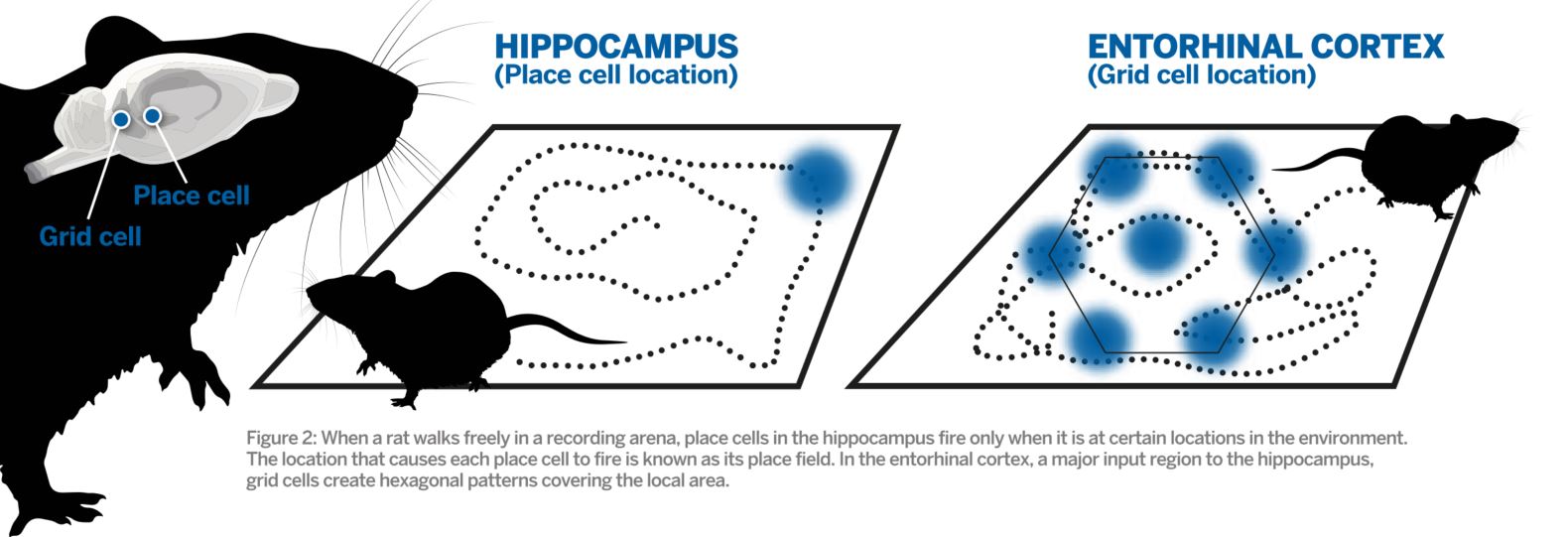
We know how place memories work quite well, Place and Grid cells specifically. There is a natural and almost physical level of 1:1 mapping at various scales[1] from location (based on different tracking systems - point integration, landmarks, your own steps) to activating cells in your brain. Simple co-activation alongside reward, like a literal map, sets down "good stuff here" signs in your brain.
Once attenuated and activated by Dopamine, the place cells to triangulate (at different "distances") that position have basically fewer mechanims and binding opportunities for neurotransmitters to change upon other interaction(they have little input beside place + pleasure + pain), so they do not result in loss of their attenuation or association (part of why place stays longest in Alhzeimers patients association).
Memory of sounds however, isn't so clearly mappable, there is no obvious grid/comparable formulation of sound memories in any kind of "order" like there is with location and places in Place Cells. And clearly we humans forget many of the sounds we have heard (e.g. songs, lyrics). That's why it's quite interesting that dogs remember toys names for a long time. It makes you ask questions like "If we had less sounds/named things to remember, could we remember the ones we do remember for much longer, with less forgetting?". "What is the difference between permanent, event and temporal memories?", "Could we resolve neurodegenerative diseases by modifying neurons to be longer lasting or impervious to future modification in strategic areas of the brain? Could be retain some learning?"
Hey, I know the feeling! It can be frustrating when we can't find something we're sure we saw on HN.
When default search failed me in the past, I've had some luck with experimental search projects that people have created. I'm sharing them hoping one might help you find what you're looking for:
Doing this with serverless might be a lot easier than building the global network & edge infra on your own.
But a real version would need to add a lot more, like auth, rotations (who on the merchant side is supposed to answer), status tracking, image management, linking to tickets and emails, etc.
It's a lot of work. But it also sounds like it'll be core functionality for you guys, an integral part of a multi tenant B2C platform. Maybe you can start with a vendor solution for a few months, gauge reactions from both the merchants and their customers, and use that to inform whether to build your own (and what features to add, if so?)
The article has some helpful points. But as a programmer-SAAS-founder-who-took-over-ads operation, I have some tips on some insights we gleaned doing paid ads (and getting it to be profitable for us):
1. Most important tip: is your product ready for ads?
  - Do not do paid ads too early.

  - Do it once you know that your product is compelling to your target audience.

  - Ads are likely an expensive way of putting your product in front of an audience.

    - No matter how good the ad operation, unless your product can convince a user to stay and explore it further, you've just gifted money to Google/X/Meta whoever.

  - If you haven't already, sometimes when you think you want ads, what you more likely and more urgently need is better SEO optimization
2. The quality of your ad is important, but your on-boarding flows are way more important still.
  - Most of the time, when we debugged why an ad wasn't showing conversions, rather than anything inherent to the ad, we found that it was the flows the user encountered _AFTER_ landing on the platform that made the performance suffer.

  - In some cases, it's quite trivial: eg. one of our ads were performing poorly because the conversion criterion was a user login. And the login button ended up _slightly_ below the first 'fold' or view that a user saw. That tiny scroll we took for granted killed performance.
3. As a founder, learn the basics
  - This is not rocket science, no matter how complex an agency/ad expert may make it look.

  - There are some basic jargon that will be thrown around ('Target CPA', 'CPC', 'CTR', 'Impression share'); don't be intimidated

   - Take the time to dig into the details

   - They are not complicated and are worth your time especially as an early stage startup

  - Don't assume that your 'Ad expert' or 'Ad agency' has 'got this'.

    - At least early on, monitor the vital stats closely on weekly reviews

  - Ad agencies especially struggle with understanding nuances of your business. So make sure to help them in early days.
4. Targeting Awareness/Consideration/Conversion
  - Here I have to politely disagree with the article

  - Focus on conversion keywords exclusively to begin with!

  - These will give you low volume traffic, but the quality will likely be much higher

  - Conversion keywords are also a great way to lock down the basics of your ad operation before blowing money on broad match 'awareness' keywords

  - Most importantly, unless your competition is play dirty and advertising on your branded keywords, don't do it.

    - Do NOT advertise on your own branded keywords, at least to begin with.

    - Most of the audience that used your brand keywords to get to your site are essentially just repeat users using your ad as the quickest navigation link. Yikes!
5. Plug the leaks, set tight spend limits
  - You'll find that while your running ads, you are in a somewhat adversarial dance with the ads platform

  - Some caveats (also mentioned in the article)

    - Ad reps (mostly) give poor advice, sometimes on borderline bad faith. We quickly learnt to disregard most of what they say. (But be polite, they're trying to make a living and they don't work for you.)

    - (Also mentioned in the article) Do not accept any 'auto optimization' options from the ads platform. They mostly don't work.

  - Set tight limits on spends for EVERYTHING in the beginning. I cannot emphasize this enough. Start small and slowly and incrementally crank up numbers, whether it be spend limits per ad group, target CPA values, CPC values - whatever. Patience is a big virtue here

    - If you're running display ads, there are many more leaks to be plugged: disallow apps if you can (article mentions why), and disallow scammy sites that place ads strategically to get stray clicks.

    - For display ads, controlling 'placement' also helps a lot
6. Read up `r/PPC` on Reddit
  - Especially the old, well rated posts here.

  - They're a gold mine of war stories from other people who got burnt doing PPC, whose mistakes you can avoid.
I don't know the exact issues but might be related to the issues why I left Apple : I was developing a very successful little tool for MacOS ( https://github.com/milgra/macmediakeyforwarder ) which listened for keypresses. From 2016 to 2019 it became harder and harder to install it because apple added more and more restrictions to apps like this. By 2019, you had to enable the application explicitly to listen for events at least in three places deep down in the system preferences, click accept in various popups and if you stuck somewhere then nobody could tell why it wasn't working. So I had a very expensive laptop and the OS didn't let me use it freely. So I just switched to freebsd and linux. Hardware quality is far away from Apple's but it is cheap, I don't have fancy productivity apps like photoshop and final cut but with open source tools and with my own desktop applications I created the best looking/most usable desktop experience MacOS will never have. ( https://swayos.github.io/ )
Valid question! Honest answer: the folk involved (including me) have more experience with Prosody these days.
Jabber.org previously ran ejabberd for years, in fact that's what it was running when I joined the admin team (I was also running ejabberd on my personal server at the time). We had quite a few problems with it back then, and for various reasons decided to switch to something else to help bring some stability to the service. This is all in the distant past (literally 10+ years ago), and I know for sure that the several problems we kept encountering on jabber.org have been fixed long ago. Many other large XMPP services run ejabberd successfully, including conversations.im.
But now that Prosody is more mature, the team has more experience with it, and it has a few more features than ejabberd that we'd like to support, it's what makes the most sense for us right now.
If you're trying to decide between ejabberd and Prosody, they average out to being equivalent in terms of protocol support. ejabberd has clustering, and a commercial option for people who want that. Prosody has a strong focus on extensibility, and has hundreds of community modules at https://modules.prosody.im which provide various kinds of extra functionality.
I don't think either project is overall "better" than the other, but each has strengths and weaknesses for specific use cases.
That's exactly what we're doing at https://www.snaplet.dev, I would love to chat with the founders about offering generated production accurate snapshots for developers to code against for users of their proxy!
I have been working on one for the past two/three months to scratch this itch. I will probably release it soon (and hopefully shill it on HN!). In the meantime, NoMachine is a very good remote desktop software (macOS and Linux), and possibly Sunshine (GameStream host), but basically I'm not sure why a more popular one exists.
In essence, a good remote desktop software will use video encoding/decoding (h264/265 for both ways being very fast) to encode captured frames of the desktop, and a good transport protocol over the network with good tuning parameters to achieve low latency (which is what mine does). I believe this is what NoMachine and Parsec do and why they are so good (along with NICE DCV). From my work I've found that video processing libraries/techniques are extremely poorly documented (think the libav* family of libraries), which makes it a very difficult segment to conquer because of what I perceive as honestly massive gatekeeping (or by Hanlon's razor perhaps laziness). There's nothing impossible about making a remote desktop software (I can say this since I'm doing it right now) but I can say it's harder than it has to be.
I am a professional technical writer. When I started out, I desperately looked for tips and tricks. Internet was (and is) full of tips but I could not find a tech-writing bibliography.
I will soon publish a bibliography of books and guides regarding technical writing. I promise to paste a link here when I am finished, which I believe I will be in a day or two.
Thank you? The place I pontificate the most, where I understand my audience, is the Komodo Kamado forum (the best ceramic BBQ made, by Art Linkletter's grandson who I've come to know): https://komodokamadoforum.com/profile/249-syzygies/
I'm known there for a "smoke pot" system for controlling smoke, and doing the math on creating steam for bread.
As a mathematician, I'm best known for my "seven shuffles" card shuffling work with Persi Diaconis, the computer algebra system "Macaulay" (too much C code), and being the math consultant for "A Beautiful Mind".
I really shouldn't blog. I'm still trying to come up with an understandable proof of the Poincare Conjecture.
My 100yr old grandma is using KOMP right now, and that's going very well. She can understand us better than on the phone. The device is on the expensive side, though, with 600 £.
Oh, that story. I remember it. A lot of the high-performers left shortly after that. It was all triggered by some lawsuit in the first place anyway. The "give everyone the same salary" was like a compromise to weaken the lawsuit while at the same time to make a positive impact on media.
If you ever find yourself in Dresden there's a fantastic tour based on Slaughterhouse Five, run by a local man who loves the book and is quite a character. A unique lens to learn about the city through.


This gets rid of the slow animations, inconsistent window cornering, and other annoyances.
Then (so menus aren't transparent and unreadable): System Settings > Accessibility > Display > Reduce Transparency
If you do those two things your machine should look and feel normal again. I've been running an M1 Max since 2021 and Tahoe was simply a disaster. Removing the glass layer made everything feel good again.
If for some reason you ever want the bad performance and glass back, you change the YES to NO in the Terminal command. Maybe someday it won't suck.